






Having a distinctive visual style is an alluring way to stand out in a game as competitive and reputation-driven as PlayerUnknown’s Battlegrounds (PUBG). Many players wonder how to make PUBG custom skins . Although there isn’t an editor in the base game, skilled modders have created processes to create, add, and test unique textures—particularly for private matches.
In order to prevent bans and game corruption, this tutorial explains the necessary tools, procedures, warnings, and safest practices.
In the sections that follow, we’ll discuss:
- Which skins (weapons, clothing, and vehicles) can be modded
- File formats and tools you’ll need
- Procedures for extracting, modifying, and repackaging textures
- How to examine and troubleshoot your skin
- Hazards, restrictions, and options (such as UGC assistance)
- A brief synopsis and recommended procedures
Let’s get started.
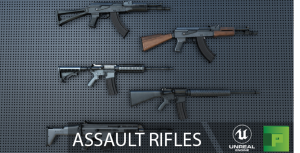
Getting to Know PUBG Skin Modding: Is It Permitted?
Modification versus the “official” skin scheme
You can alter your character’s attire, weapon skins, vehicle wraps, and other elements using PUBG’s regular customization system—but only with resources that the game itself provides. These have no effect on gameplay and are purely decorative.
However, making completely unique skins (i.e., your own texture files) requires changing or adding new assets, which PUBG does not formally support. The majority of PUBG custom skin operations are used in private matches or custom servers, not in standard online competitive modes.
Indeed, “mods, impermissible game modifications, hacks, or devices that circumvent intended protections” are expressly prohibited by PUBG’s content guidelines. This means injecting skins into official servers puts you at risk of being detected by anti-cheat software.
At what point is skin modding permissible?
PUBG Custom skins can be safely experimented with in:
- LAN settings or private matches
- Custom/community servers or local servers
- Test or offline maps
PUBG Custom skins should not be used in ranked, official, or anti-cheat-monitored battles. When playing in regular mode, always retain backup copies of the original files and disable any modified assets.
According to reports, PUBG is looking toward supporting UGC (User Generated Content) mods in 2025, which might create secure avenues for submitting unique skins. However, until that becomes official, PUBG custom skins continue to be a hobbyist activity rather than a supported feature.
Required Equipment, Formats, and Preparation
Before you can edit or make PUBG custom skins, you must obtain the necessary tools and understand the file types used by PUBG.
Crucial Equipment
- UE Viewer (Unreal Engine Viewer) – Browse and export game assets (textures, meshes) from .pak files.
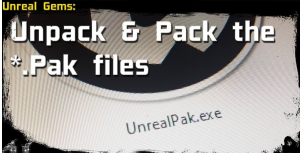
- Pak extractor/editor – Open, unpack, and repack Unreal Engine .pak archives.
- Image editing software – Photoshop, GIMP, or others that allow texture editing, alpha channels, and .DDS support.
- DDS/texture format plugin – Ensure your editor can import and export DDS (DirectDraw Surface) files.
- Hex editor (optional) – Fix headers or raw texture data mismatches.
- Backup/version control system – Tools like Git or manual folder backups prevent data loss.
Naming Conventions and File Formats
PUBG skins are stored in .pak files. Textures are often saved as compressed .dds textures or as .uasset, .uexp, or .ubulk files. Some modders note that .ubulk files sometimes need DDS headers added.
When editing textures, always follow these rules:
- Maintain the same aspect ratio and resolution
- Use the same compression format (e.g., DXT1/DXT5)
- Follow the exact file/folder structure
- Use the same file names as the original assets
Any mismatch could cause PUBG to crash, display errors, or detect the modification.
Get Ready by Backing Up
Before you start:
- Copy the entire TslGame\Content\Paks directory to a safe folder.
- Identify which .pak file contains the skin(s) you want to modify.
- Record the asset path (e.g. TslGame\Content\Skins\Weapon\AK47.dds) for easy reinsertion later.
Having clean backups ensures you can restore your files if something goes wrong.
Detailed: Make & Apply Custom Skin
This section outlines a practical, step-by-step workflow to make unique skins in PUBG. Adjust as necessary for your system or server.
Step 1: Extract the Base Texture
- Use the UnrealPak tool or pak extractor to open the .pak file.
- Navigate to the folder where the skin is stored (e.g. Content\Skins\…).
- Extract .uasset, .ubulk, or .dds files, keeping the folder structure intact.
- Export the texture as .dds or .png using UE Viewer.
You now have your base texture ready for editing.
Step 2: Design and Edit
- Open the texture in Photoshop or GIMP.
- Add new colors, decals, logos, or patterns while following the UV layout.
- Maintain alpha transparency if present.
- Export using the same format, bit depth, and compression.
- Use conversion tools if your editor doesn’t natively support PUBG’s format.
Step 3: Repair or Replace in the Original Container
- Rename your edited texture exactly like the original file.
- Place it in the same internal folder structure.
- Rebuild the .pak archive using UnrealPak or a “pak maker” tool.
- Double-check that all paths and compressions match correctly.
Step 4: Test in a Secure Setting
- Launch PUBG in private server or offline mode.
- Locate the weapon or outfit using your new skin.
- Look for texture issues (misalignments, seams, or artifacts).
- Adjust and re-export as needed until clean.
Step 5: Optimize and Iterate
- Keep texture sizes efficient.
- Remove unused transparency.
- Check for performance impact—huge textures can cause lag.
- Maintain logs for each version so you can revert easily.
After a few iterations, you’ll stabilize a clean, functional skin.
Benefits, Drawbacks, and Common Mistakes
Benefits
- Full creative freedom
- Unique, personal visual identity
- Ideal for modding communities or private servers
- Builds transferable modding/texture design skills
Drawbacks & Dangers
- Ban risk: Altering game files can trigger anti-cheat systems.
- Update conflicts: Game updates can invalidate your mods.
- Compatibility issues: Wrong naming or formats can cause crashes.
- Legal issues: Violates PUBG’s policies if used in official modes.
- Performance drops: Oversized or unoptimized textures can cause lag.
Common Pitfalls to Avoid
- Always use correct folder and file names
- Don’t change resolution unless patched correctly
- Match compression formats
- Restore originals before joining public servers
- Test locally first
- Backup .pak files before editing
Tip: Some “pak maker” tools online may be unsafe or outdated. Use trusted community resources and avoid random downloads.
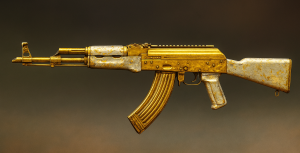
Example: Custom AK-47 Skin Walkthrough
Here’s a brief case study showing how to create and test a custom AK-47 skin:
Found PakWeapons.pak containing AK-47 skins in Content\Skins\Weapon\AK47\.
Extracted AK47_Skin01.uasset, .ubulk, and .uexp files.
Exported to AK47_Skin01.dds via UE Viewer.
Edited the texture in Photoshop with a custom camo and logo.
- Edited the texture in Photoshop with a custom camo and logo.
- Saved as DXT5 .dds file.
- Inserted into ModProject\TslGame\Content\Skins\Weapon\AK47\.
- Rebuilt using UnrealPak.
- Tested in a private match — noticed a seam near the magazine.
- Fixed UV edges and re-exported.
Result: a clean, seamless, custom AK-47 camo skin.
After iteration, the skin looked nearly identical to official ones but with your unique style.
Future Prospects: Safer Customization, Creator Support, and UGC
Since mid-2025, PUBG has hinted at upcoming UGC (User Generated Content) support. This would introduce official tools for creating and submitting skins safely—no manual modding required.
If implemented, this system would:
- Allow official skin submissions via creator tools
- Ensure anti-cheat compatibility
- Enable use in public or ranked modes (after moderation)
- Eliminate most ban or legal risks
Until then, manual modding remains a community-driven and experimental activity for private environments only.
Synopsis & Recommended Procedures
Let’s review the main lessons for creating custom PUBG skins:
- PUBG doesn’t officially support custom skin creation—modding is a workaround.
- Use trusted tools like UE Viewer, UnrealPak, Photoshop, or GIMP.
- Always back up your .pak files and assets.
- Maintain original naming, compression, and resolution.
- Test offline or on private servers.
- Avoid custom skins in official matches to prevent bans.
- Keep an eye out for UGC updates for safe, official customization.
Follow these steps carefully to enjoy your own creative, personalized PUBG experience—while minimizing risks.
FAQs
Q1: Are my personalized skins allowed in official PUBG online matches?
No. Using custom skins in ranked or anti-cheat matches can lead to detection or bans. Use them only in private or custom matches.
Q2: In PUBG, what file type is required for my PUBG custom skin?
Textures typically use .dds compression (e.g. DXT1, DXT5) and are stored inside .uasset, .ubulk, or .uexp files. Keep formats and names consistent.
Q3: Is it currently possible to make custom skins in PUBG officially?
Not yet. PUBG is developing UGC (User Generated Content) support that may eventually allow skin submissions through official tools.
Q4: How can I mod skins safely without getting banned?
Back up your files, test privately, and never use mods in ranked matches. Avoid unsafe mod tools or sharing potentially harmful files online.
Q5: Is it possible to make custom PUBG Mobile skins?
PUBG Mobile doesn’t allow full PUBG custom skins. Limited personalization via color and patterns is available, but complete texture mods are risky.
Q6: Which tools are most used to create .pak files?
Modders mainly use UnrealPak (from Unreal Engine) or “All-in-One Pak Maker” utilities designed for packaging modded content.